DKIM KEY SIZE ERROR

Hi,

I tried adding my first sending domain, but the DKIM authentication TXT record is too long to fit in the cPanel DNS Zone Editor.

So, how can I reduce the DKIM key size?
 
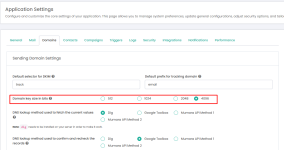
in Mumara campaign you have the flexibility to change the domain key size from application settings

1735910936805.png


and if you dont intend to change the key from application setting or have no access being a User you can add it to your cPanel DNS Zone Editor by following these steps:
  1. Copy the Key: Log in to your Mumara account and copy the DKIM key.
  2. Paste in Zone Editor: Navigate to the DNS Zone Editor in your cPanel and paste the key in the designated TXT record field. Note that the key will appear incomplete.
  3. Copy the Remaining Key: Return to your Mumara account and copy the remaining part of the DKIM key.
  4. Add the Remaining Part: Click on "Add TXT String to Record" in the DNS Zone Editor and paste the remaining part of the key into the text field.
  5. Verify the Entry: Ensure the full DKIM key has been entered correctly without any errors.
Here’s a screenshot for reference:

1735826990548.png
 
Last edited:
Back
Top